
Marketplace
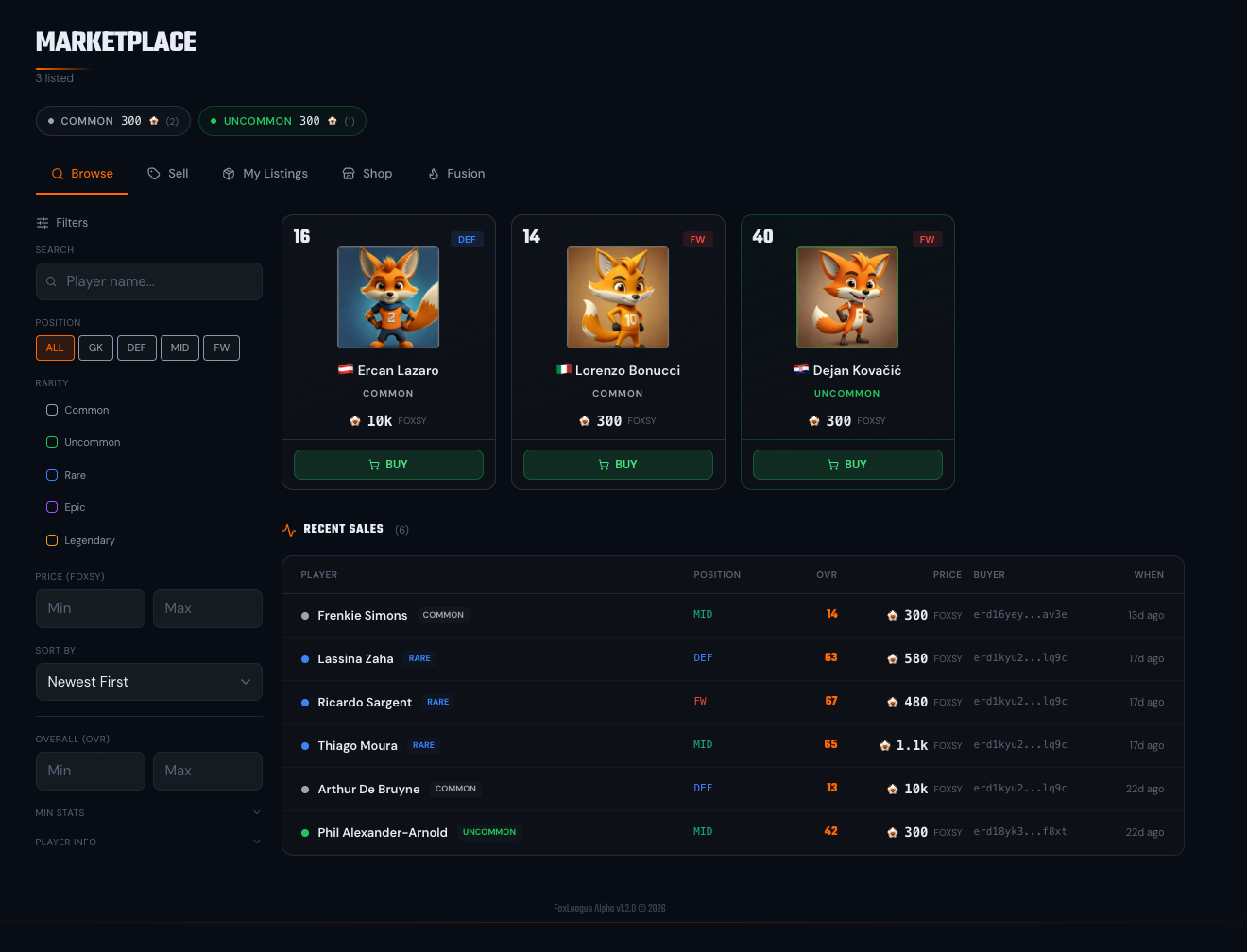
The Marketplace is where you trade player NFTs for FOXSY. Auction your spares, bid on what other managers are selling and rotate your roster without burning anything.
On mainnet every sale runs as a 24-hour auction. Instant buy-now listings are switched off in the smart contract, so a seller sets a reserve price plus a clock while buyers compete with bids.
Listing a player
Section titled “Listing a player”- Open the Marketplace tab → Sell sub-tab
- Find the player in your roster
- Enter the reserve price in FOXSY, then click START AUCTION
- Approve the listing transaction in your wallet. The NFT moves into the contract’s escrow for the 24 hours the auction runs
Reserve prices are whole FOXSY between a minimum of 10,000 and a maximum of 1,000,000. The Sell form refuses a price below the minimum. No bid under the reserve is ever accepted, so the reserve is the lowest amount you can be forced to sell at.
A marketplace fee (currently 10%) is charged only when the auction actually sells. Listing costs nothing beyond gas. The fee comes out of the winning bid, so the seller receives the bid minus the fee.
A player who has just been sold cannot be auctioned again for 48 hours. The countdown is per player, enforced on chain, so a card cannot be bounced between wallets to fake volume.
The listing gate: 20 competitive matches
Section titled “The listing gate: 20 competitive matches”A card can be put up for auction only once it has 20 competitive matches, the same two gates Fusion uses:
- Waived matches count: the fusion match waiver credit on the card (up to 15 matches bought at 20 FOXSY each, when the waiver is enabled) is added to the card’s competitive matches
- At least 5 matches must really be played. No amount of credit takes a card with fewer than 5 played matches onto the market
The players contract refuses the listing otherwise, so the Sell form disables the button with the reason: Sell after 20 competitive matches (waived matches count, 5 must be played). The card shows its count as “played + waived / 20”. Cards straight out of a Common pack or a fusion start at 0. Listings that were already open when the gate arrived are unaffected. What counts as a competitive match is explained on the Fusion page: Silver or Gold tournament matches plus 1v1 challenges, never games against the AI.
Bidding on a player
Section titled “Bidding on a player”- Marketplace → Browse sub-tab
- Use the sidebar to filter by name, position, rarity, price, OVR, minimum values for each of the 7 stats, level or condition. Filtering is instant (no reload); the grid shows 24 cards per page
- Click a card to see the player’s full details plus the time left on the auction
- Enter a whole-FOXSY amount, click PLACE BID, approve the FOXSY transaction
The bidding rules are enforced by the smart contract:
- Your first bid on an auction must be at least the reserve
- Every later bid must beat the current highest bid by at least 5%
- Your FOXSY is held in escrow while you are the top bidder. The moment someone outbids you it is sent straight back to your wallet
- A bid placed in the last 300 seconds pushes the end time out by another 300 seconds, so a last-second snipe only buys the other bidders more time to answer
- You cannot bid on your own auction
When the clock runs out the platform settles the auction for you: the NFT goes to the winner, the seller receives the winning bid minus the 10% fee. You never pay settle gas. If no one bid, the player simply goes back to the seller.
A player you win at auction has NO transfer cooldown. You paid full price, so you can field them immediately.
Canceling a listing
Section titled “Canceling a listing”Changed your mind? Open Marketplace → My Listings and click Cancel on the card. The same Cancel button also appears on your own card in the Browse grid plus its detail modal. The player returns to your roster with no fee. The listing disappears from the browse grid.
Cancelling only works while the auction has zero bids. Once a bid lands you are committed until the clock ends, which is what stops a seller pulling a card out from under a bidder.
Wallet-to-wallet transfers (transfer cooldown)
Section titled “Wallet-to-wallet transfers (transfer cooldown)”If someone sends you a player NFT directly (not through the marketplace), the player has a transfer cooldown before you can use them in matches. The cooldown is 21 days (504 hours) for a card that had at least 20 competitive matches when it moved. A card moved before 20 competitive matches is locked for 63 days (1,512 hours) in the new wallet: a fresh starter card, a pack card or a fusion output cannot be handed to another wallet and played there the same season. The length is fixed on the card at the moment of the transfer, so a later rule change never shortens or extends a cooldown already running. It encourages fair play plus marketplace use, preventing off-market roster manipulation right before a tournament. Auction wins, fusion results, distribute events, shop mints are exempt. Only direct wallet-to-wallet transfers trigger it. A cooled-down player also cannot be used as a fusion input, so you cannot launder the cooldown through fusion.
The player card shows the cooldown countdown while it’s active. The transfer dialog states the rule before you sign.
You can pay to reduce a transfer cooldown down to the floor the shop shows (currently 3 days, 72 hours; the remaining floor can never be waived). Open Marketplace → Shop → Reduce Cooldown, pick the player, then pay the FOXSY price shown. The price is per day reduced and depends on the player’s rarity (Common 25 up to Legendary 1,250 FOXSY per day), the same rate for a 21-day and a 63-day cooldown. See the Shop for the full table.
The transfer cooldown is not the only clock a player can carry. A card that came out of a fusion has its own 14-day fusion cooldown, which only limits fusion, never play or listing. See Fusion.
Recent Sales feed
Section titled “Recent Sales feed”The Recent Sales widget on Marketplace shows the latest completed sales. What sold, for how much and who bought. Useful for price discovery before you list your own.
The Browse sidebar filters for name, position, rarity, price plus OVR also narrow the feed. The sort dropdown reorders it the same way. The heading shows how many sales match your filters (for example “12 of 20”). The stat, level plus condition filters apply to listings only. The feed loads 20 sales at a time with a Load More button.
Two more price signals sit at the top of the page: floor-price pills above the tabs show the lowest active listing per rarity (with the listing count) while the header shows the total 24h sales volume.
- Play before listing. A card needs 20 competitive matches to be auctioned, 5 of them really played; the rest can be waived at 20 FOXSY a match when the waiver is enabled. A fresh pack card or a fresh fusion output is not sellable on day one.
- Sync before listing. Otherwise the button turns into SYNC & AUCTION and you sign two transactions (the sync at 10 FOXSY per unsynced player, then the listing). Bidders only ever see synced stats, not what you’ve trained since.
- Wait for the button after listing. Once a listing confirms, the Sell button stays held for up to 20 seconds until the NFT has visibly left your wallet, so a second listing does not fail on stale wallet state.
- Watch the Recent Sales feed. It’s the cleanest signal for what the market is paying for similar players today.
- Set the reserve as your real walk-away price. The auction can close at the reserve if only one bidder turns up, so never list at a number you would regret. Pricing too high instead ends the 24 hours with no bids and the player back in your squad.
- Bid early enough to matter. The last 300 seconds extend on every bid, so waiting for the final tick wins nothing. It only hands the other bidders another five minutes.
- Avoid wallet-to-wallet for active rosters. Send via the marketplace if the buyer needs the player immediately; direct transfers cost the recipient the full 21-day (504-hour) cooldown, 63 days for a card under 20 competitive matches, unless they pay to reduce it down to the 3-day floor.