
Tactics & Formations
The Tactics tab is where you commit who plays and how they’re arranged. Your saved lineup + formation drive every match you kick off.
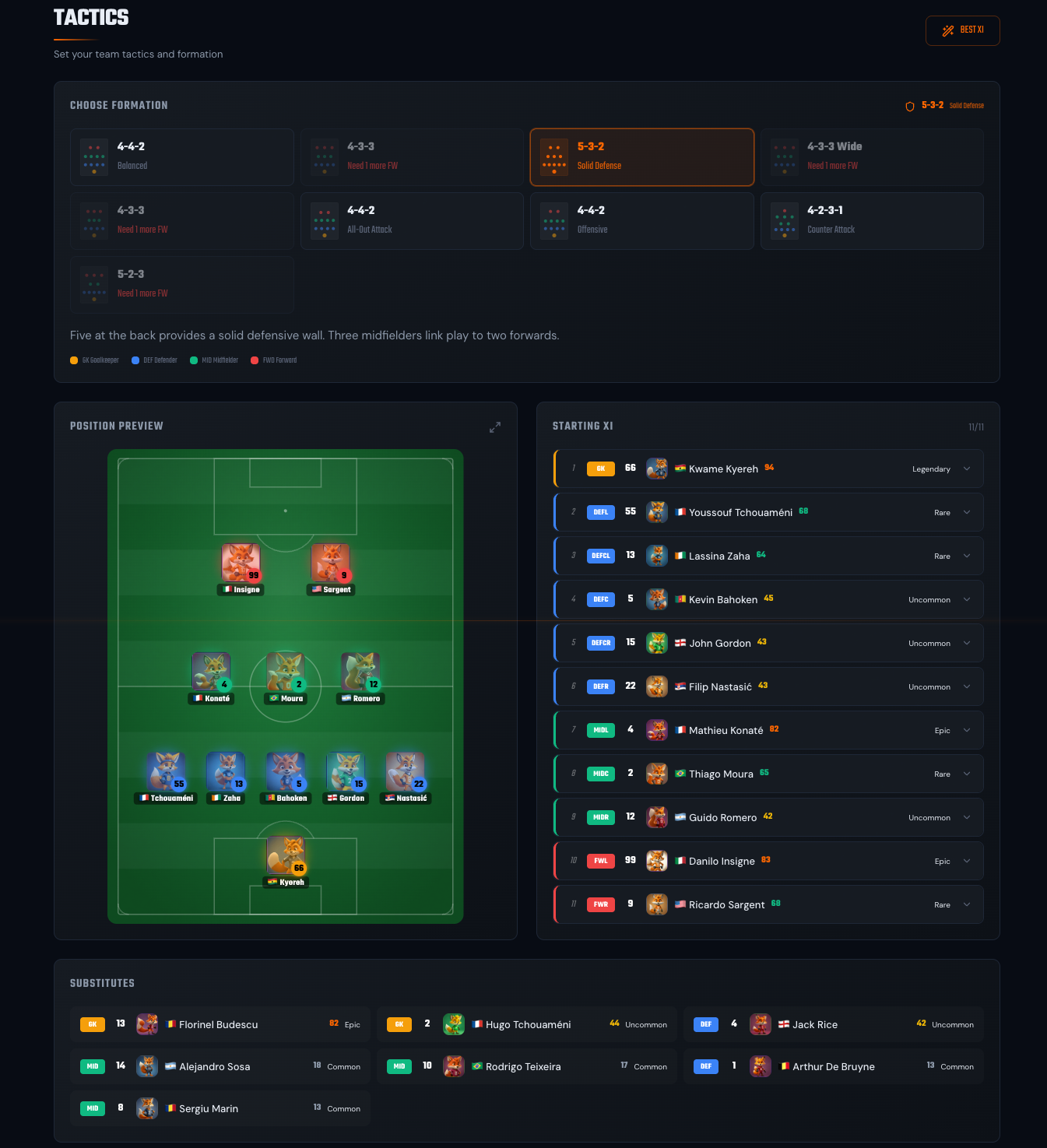
Formations
Section titled “Formations”FoxLeague offers eight formations. Some share the same base shape (two variations of 4-4-2, three of 4-3-3) but adjust player positioning and attacking style differently. Pick the one that matches your squad’s strengths.
A ninth, 4-4-2 - All-Out Attack, is not offered yet because the match engine cannot play it. A team that saved it earlier plays 4-4-2 - Balanced in its matches until it is available. Its card stays in Tactics marked Coming soon, with a notice.
4-4-2 family
Section titled “4-4-2 family”- 4-4-2 - Balanced. Classic. Four defenders, four midfielders, two strikers (even coverage across all areas).
- 4-4-2 - Offensive. Midfield pushes up into a 4-2-4 attacking shape with four forwards.
4-3-3 family
Section titled “4-3-3 family”- 4-3-3 - Attacking. Three forwards, strong attacking power with wide play (midfield can be exposed).
- 4-3-3 - Balanced Attack. Balanced 4-3-3 that maintains shape in both phases (same attacking and defending).
- 4-3-3 Wide - Wide Play. Wide 4-3-3 in attack, drops into 3-4-3 in defense. Wing forwards stretch the opposition with maximum width.
Other shapes
Section titled “Other shapes”- 4-2-3-1 - Counter Attack. Modern setup. Double pivot shields the defense and collapses to 3-1-3-3 when defending.
- 5-3-2 - Solid Defense. Five at the back, three midfielders link play to two forwards.
- 5-2-3 - Wing Attack. Five defenders transition into 3-2-3-2 when attacking. Wing-backs push forward to support three forwards.
Pick by clicking the formation card at the top of Tactics. The pitch view animates to the new shape and fills it with your best XI for that shape as an unsaved draft. Nothing changes until you click SAVE. Clicking your saved formation again brings back your saved lineup.
Setting your XI
Section titled “Setting your XI”The pitch view shows position slots. Drag a player from your roster (left side) into a slot. Constraints:
- Position must match (a Defender can’t fill a Forward slot)
- A few slots name the role the shirt plays instead of its line. In 4-2-3-1 and 4-4-2 - Offensive one defender slot reads DM (a defensive midfielder in front of the back line); in 4-4-2 - Offensive the two wide midfield slots read FWL and FWR (wide forwards level with the strikers, whose slots read FWCL and FWCR). The line still decides who fills the slot: hover over the label to read it, for example DM, filled by a Defender or FWL, filled by a Midfielder
- Player must be eligible (not listed for sale, not in a transfer cooldown)
- One slot per player (you can’t field the same player twice)
Each slot shows the position requirement (GK / DEF / MID / FWD) and the assigned player’s OVR. Empty slots are red.
The server keeps the same position rule. A lineup with a player in a slot of another line is refused with the message Tactics shows, for example Fox 7 is a FW. Slot requires DEF, whatever app or script sends it. Nothing is saved then.
Save your lineup
Section titled “Save your lineup”On the formation you have saved, every change you make to the lineup (a drag, a tap swap, BEST XI) is saved at once. A different formation card opens as an unsaved draft: the SAVE button appears at the top of the page next to BEST XI. The draft (with any change you make to it) is committed only when you click it. The saved formation carries a green Saved badge. The Squad Readiness widget on PlayMatch shows the formation you saved next to its ready / owned count.
If you leave a draft unsaved, your saved formation and lineup stay in effect.
SAVE commits the formation and its lineup together in one save. If the lineup is refused (a player listed for sale in the meantime, for example) neither changes: your saved formation keeps its Saved badge and its lineup. A new formation is always saved together with a lineup that fits it.
A starter not in your squad. When a card of your saved eleven is not in your squad when you open Tactics (listed for sale, sold or away for a few seconds during a stats sync), a notice reads 1 starter is not in your squad right now (or N starters) and says your lineup was not changed. Opening the page never saves anything. Fill from the bench puts a substitute of the same line in each empty slot and saves; when a line has no substitute, Best XI picks a full eleven. A card away for a stats sync you started in the last 15 minutes stays in your squad, unless the chain shows another wallet holding it, so a sync alone does not show the notice. When the chain shows no holder at all, the card stays only if it is one of the cards that sync carries: a card burned in a fusion has no holder either. In a tournament the lock does it for you: a starter sold to another wallet or listed for sale is replaced by a fit substitute (see Auto-subs and forfeit).
Injured and suspended players
Section titled “Injured and suspended players”From the moment yellow card bans and injuries start (see Players) Tactics shows who cannot play:
- The marks. Every row of the Starting XI, the Substitutes and the Reserves plus every player on the Position Preview shows the red cross with the time left for an injured player (for example 3d, hours on his last day) and a red card for a suspended one. Hover or long-press the mark for the exact end and the rule. The count of yellow cards toward a ban is on the Squad page and the card’s profile, not here.
- The notice. Above the lineup a notice names each player of the 18 on screen who is out and says what happens to him when the lineup locks: an injured or suspended starter is replaced by a bench player of the same position; an injured or suspended substitute sits out and your bench plays one short. A suspended player misses only your next tournament match: he still plays in a 1v1 challenge or a ranked game. The notice follows the lineup as you change it.
- You can still save. A lineup with an injured or suspended player saves as usual: the lock makes the changes for you (see Auto-subs and forfeit). When fewer than 11 of your 18 are left the notice warns that the match would be forfeited 3-0.
- Best XI. The BEST XI button, the preview of another formation and the Fill repair pick players who can play first. A suspended player is picked only when his line has no fit player. An injured player is picked only when no other card can take the shirt or the bench seat, because a lineup saves only as 11 starters plus 7 substitutes: with a small squad he takes the last bench seat and the notice names him. The repair of a saved eleven never proposes an injured substitute.
Rotating reserves in
Section titled “Rotating reserves in”If you own more than 18 players (e.g. you’ve bought extras on the marketplace or fused new ones), the surplus shows up in a Reserves strip below the bench. You can rotate them into the lineup or onto the bench directly from Tactics. No need to bounce out to the Squad page.
The flow is tap-to-select, tap-to-place:
- Tap a Reserve card. It gets an orange outline and the hint above the strip reads Tap a highlighted lineup or sub slot to swap. Tap reserve again to cancel. Only the slots of the same position (in the XI or on the bench) accept the tap; an empty one reads Tap to swap here.
- Tap a highlighted slot. The Reserve swaps in. Whichever player was occupying that slot is displaced. They drop back into the Reserves pool.
- On your saved formation the swap is saved at once. On an unsaved formation draft, click SAVE to commit it.
You can cancel a selection by tapping the same Reserve again.
Position still matches strictly. A Forward Reserve can only swap into Forward slots. Listing or fusing a Reserve still happens on the Marketplace → Fusion / Marketplace → Sell flows.
What actually drives the match
Section titled “What actually drives the match”When you kick off:
- Your saved lineup decides who’s on the pitch.
- Each player’s synced stats drive their on-pitch performance: passing range, shot power, recovery, decision-making. Any training that isn’t synced yet won’t show on the pitch.
- Your formation decides starting positions and roles.
- The match plays out live (around 10 minutes). Watch the action unfold, then check your History to relive past matches anytime.
Level does not change in-match performance. Condition does: every stat of a starter is scaled by condition, from full strength at 100 down to half strength at 0. Condition also decides availability (see below). Your synced stats, the right players in the right positions and the formation that fits them are what win games.
Squad Readiness widget
Section titled “Squad Readiness widget”The widget on PlayMatch shows ready / owned players, where ready means the player’s condition is at or above the match floor (currently 30). It’s a health check, not the kickoff gate. To kick off you need a saved lineup of 11 starters + 7 substitutes, at least 18 unlisted players in your wallet, no starter at 0 condition and none of the 18 (starters or bench) in a transfer cooldown or listed for sale.
Save a lineup with fewer than 7 substitutes and the bench is completed for you position for position: 1 goalkeeper plus 6 outfield players split like the lines of your formation (4-3-3: 2 DEF, 2 MID, 2 FWD; 4-4-2: 2 DEF, 3 MID, 1 FWD; 5-3-2: 3 DEF, 2 MID, 1 FWD). The substitutes you picked stay and count toward their line. Each line takes your strongest eligible cards; a line without enough cards gives its places to your strongest remaining ones. During a match the coach brings a substitute on for a tired player, position for position. Only a bench card of the tired player’s own line comes on (a keeper only for a keeper). With no bench card of that line left, the player stays on. Substitutions open from the middle of the second half.
While one of your 18 is listed for sale, KICK OFF stays disabled and the line under it reads 1 player is listed for sale: cancel the listing or swap it out (with two of them: 2 players are listed for sale: cancel the listing or swap them out). Below it, My Listings opens your listings to cancel one; Open Tactics lets you swap the player for a reserve.
A substitute you list for sale stays on your saved bench until you save a change. Tactics shows his seat as Empty seat: tap a reserve, then this seat, so you choose who sits there. Any swap you save takes him off the bench and fills his seat from your reserves position for position. A notice says so: 1 substitute listed for sale left your bench. Auto-filled 1 substitute from your reserves… Best XI and a new formation pick a whole new bench without him. With no reserve left to take his seat the save is refused: cancel the listing to keep him on your bench or get one more card.
Reasons a player might NOT be ready:
- Below the condition floor: condition under 30. In tournaments and 1v1s such starters are auto-substituted from the bench by a player of their own line first (see Auto-subs and forfeit); if fewer than 11 fit players remain the match is forfeited 3-0
Reasons a player can’t be fielded even when ready:
- In transfer cooldown: 21 days (504h) after a wallet-to-wallet receive, which you can pay to cut to a 3-day floor, every day of it or only some, in Marketplace → Shop → Reduce Cooldown. A card moved before its match gate: 21 days plus 6 hours for every missing match, shorter only with match waivers
- Listed for sale: escrowed on the marketplace until you cancel the listing. In a tournament a listed starter is replaced at the lock by a fit substitute; when the bench has none to spare he plays, since a listing alone never forfeits a match. A listed card is never on the bench for the match, so he can never come on during it
Kickoff can also be blocked at the account level: from 1 hour before one of your tournament or 1v1 matches is scheduled until its broadcast ends, casual and ranked play is off.
The widget breaks down by position so you see if you’re short of, e.g., midfielders.
- Match stats to position. A high-Defense Defender is worth more than a high-Defense Forward. Stats interact with their role on the pitch.
- Sync and lineup are independent. A sync writes every card of yours that has unsynced training (or the one card you sync from its profile), whether or not it is in your XI. Saving the lineup changes nothing about what is synced.